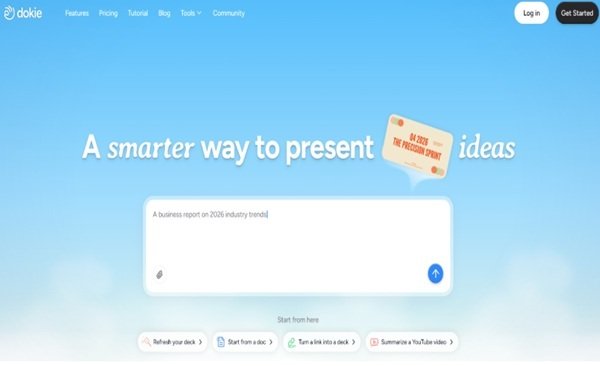
Not every AI presentation tool fits every user. Dokie AI is not trying to be everything.
The real question is: is it the right tool for your specific workflow?
What Dokie AI Is (and What It Is Not)
Before deciding if Dokie AI is right for you, it’s important to set expectations.
What Dokie AI is:
- A tool for structured, professional presentations
- Focused on usability and efficiency
- Designed for real work scenarios
What Dokie AI is NOT:
- A design-first tool
- A creative storytelling platform
- A “wow-effect” presentation builder
This clarity helps avoid choosing the wrong tool for the wrong purpose.
The Core Idea Behind Dokie AI
Dokie AI is built around one simple idea:
👉 “Your slides should already make sense before you design them.”
Most AI tools generate content. Dokie AI tries to generate structured thinking.
That’s why it performs better in business environments.
Key Features That Matter for Decision Making
1. Structured Slide Generation
Dokie AI creates presentations with a clear flow:
- Context
- Problem
- Insights
- Recommendations
- Summary
This is ideal for:
- Reports
- Strategy decks
- Client presentations
2. Simple Input, Predictable Output
You don’t need complex prompts. Even simple inputs generate usable slides.
This makes it:
- Beginner-friendly
- Consistent across use cases
3. Free AI PPT Tools (Strong Differentiator)
Dokie AI also offers a set of free AI PPT tools that expand its usefulness beyond just generation.
You can convert:
- PDF files into presentation slides
- Word documents into PPT decks
- Plain text into structured slides
- Excel data into presentations
- JPG images into slides
- PNG images into presentations
- HTML content into slides
- DOC files into PPT format
This matters because most users don’t start from scratch. They already have content.
Dokie AI helps turn that content into slides quickly.
Decision Framework: Should You Use Dokie AI?
Case 1: You Create Presentations Weekly or Daily
👉 YES, Dokie AI is a strong fit
You will benefit from:
- Faster structure creation
- Less editing
- Consistent output
Case 2: You Care About Design and Visual Impact
👉 Probably NOT the best choice
You may prefer:
- Design-heavy tools
- More visual flexibility
Case 3: You Already Work with Documents (Word, PDF, Excel)
👉 YES, strong fit
The free conversion tools will save you a lot of time.
Case 4: You Need Creative or Storytelling Presentations
👉 NOT ideal
Dokie AI is optimized for logic, not storytelling.
Case 5: You Want an All-in-One Design Platform
👉 Consider alternatives
Dokie AI is focused, not all-in-one.
Where Dokie AI Fits in the AI Tool Landscape
Most AI presentation tools fall into three categories:
1. Design-First Tools
- Focus on visuals
- Weak on structure
2. Speed-First Tools
- Fast generation
- Require heavy editing
3. Structure-First Tools (Dokie AI)
- Strong logical flow
- More usable output
Dokie AI clearly belongs in the third category.
Real Workflow Example
Let’s say you need to create a monthly performance report.
Without Dokie AI
- Build outline
- Write slides
- Organize flow
- Adjust structure
With Dokie AI
- Input topic
- Get structured draft
- Add your data
With Free Tools
If you already have:
- A Word report → convert to slides
- Excel data → turn into presentation
- PDF summary → generate deck
This is where Dokie AI stands out.
Pros and Cons (From a Decision Perspective)
Pros
- Strong structure for business use
- Saves time on organization
- Easy to use
- Free AI PPT tools for content conversion
Cons
- Limited design flexibility
- Not ideal for creative presentations
- Less visual polish
Common Mistakes When Choosing AI PPT Tools
Mistake 1: Choosing Based on Design
Pretty slides do not mean usable slides.
Mistake 2: Ignoring Workflow Fit
If the tool doesn’t fit your workflow, you won’t use it.
Mistake 3: Overvaluing Speed
Fast generation is useless if you spend time fixing everything.
Dokie AI avoids these issues by focusing on usability.
Final Verdict: Who Should Actually Use Dokie AI
Dokie AI is the right choice if:
- You create presentations often
- You care about clarity and structure
- You want to save time
It is not the best choice if:
- You prioritize design
- You need highly creative slides
FAQs
1. Is Dokie AI beginner-friendly?
Yes, it is simple and easy to use.
2. What makes it different from other tools?
Its focus on structured, usable slides.
3. Are the free tools useful?
Yes, especially for converting existing content into presentations.
4. Can it replace PowerPoint?
Not fully, but it speeds up the process.
5. Who should avoid Dokie AI?
Users who prioritize design or creative storytelling.